Author: Steve Fenton

  • Remaining deployable at all times

    Remaining deployable at all times

    When you can’t deploy on demand, you’ve lost control of your software. Risk accumulates in unreleased code, and the more changes you store in one place, the more chance they have of triggering overheads, rework, and failures. When you have blockers stopping you from going live, you’ll start to accumulate dangerously high levels of risk unless you prioritize deployability.

    By choosing to do work that returns software to a deployable state ahead of any other kinds of work, like feature development, you’ll avoid the toxicity of tangled work batches. Instead, you can smoothly flow changes between test and production and get the feedback you need to be confident that your software works.

    Crucially, if you discover a high-severity bug or security problem, there are no roadblocks to getting fixes into production. You don’t need a special “expedited lane” for these changes, which means you don’t skip steps that let bad changes into your codebase.

    Let’s take a look at problem indicators that will help you identify and fix common deployability issues. The goal of answering the deployability question is a mile marker, not the destination, but if you can’t answer the question, you’re going to waste time looking for landmarks!

    Watch the episode

    You can watch the episode below, or read on to find some of the key discussion points.

    The awkward silence problem

    When you ask your team, “Are we ready to deploy?”, the correct answer is either “absolutely” or “no way”. The worst possible answer is silence or confusion. If the team doesn’t know whether they can deploy, they’re missing the deployment pipeline that would generate the answer.

    When you commit a code change, build errors should be returned to you within a couple of minutes. At the end of 5 minutes from your commit, a suite of fast-running tests should tell you if you’ve broken functionality or the quality attributes of your application. Dependency checks, code scanning, and other static analysis tools should have told you if you have a problem. If you have long-running tests or tests that depend on the new software version being deployed to a test environment, you should know in another 5-20 minutes if they’ve detected a problem.

    After all these checks, you should have a version of your software running in a test environment that you have high confidence in. If someone asked you whether you’re ready to deploy, you’d answer “absolutely”.

    Deployment automation makes sure the deployment is a non-event. It guarantees the same process is used to deploy to all environments, and makes it trivial to deploy on demand. A solid deployment pipeline contains all the checks you need to know whether you can deploy.

    Manual testing is a ceiling, not a floor

    Teams often treat manual testing as a foundation for verifying that a software version works. In reality, it acts more like a ceiling, limiting your ability to flow changes to production. As your software becomes more complex, the ceiling descends as the testing takes longer.

    Long test cycles make you subvert your process to the speed at which you can test. You’ll notice when this happens because you’ll keep looping back to fix bugs and restart the test process. From the earliest change you make, through each bug list and all the re-testing, right through to the final software version, you are not deployable.

    Automating your tests is the real foundation for your software. This raises the ceiling and moves the constraint away from the test cycle.

    Your old code wasn’t written to be tested

    If your application is successful, it will have some history. Part of that history is often that it wasn’t written with test automation in mind. That means you need to identify where your risk is, work out how to find the seams that will make it testable, and start adding characterizing tests.

    Once some old code is wrapped with tests, it becomes far easier to change the code design, because the tests will fail if you break something.

    Automation is living documentation

    When developers move on, a portion of your institutional knowledge goes with them. High-quality documentation can help teams distribute this knowledge and reduce its loss, and the best kind of documentation is test automation.

    Well-written automation, like tests, deployment automation, and infrastructure as code, performs useful functions while effortlessly documenting them. Because you make all changes through the living documentation, it is always up to date.

    The hidden cost of undocumented knowledge becomes painfully clear when you have to deploy without the person who normally handles it. You follow their checklist carefully, confirm every step, and everything looks right; yet the deployment still fails. What you didn’t know is that the checklist stopped being accurate months ago, because the person doing the deployments stopped consulting it. All the new steps they introduced lived in their head, not on paper.

    The living documentation built into automation tools is especially valuable when onboarding new developers. Rather than relying on tribal knowledge passed down through conversations and shadowing, a new team member can read the test suite and understand not just what the software does, but what it’s supposed to do and why certain behaviors matter. That’s documentation that keeps pace with the code because it is the code.

    The value of long-term sustainability

    Like its Agile predecessors, Continuous Delivery values long-term sustainability. That means you invest a little more effort up front to constrain maintenance costs over the long term. Writing tests may mean a feature takes 20-25% more time to implement, but the defect density can be 91% lower than similar features not guided by tests (Microsoft VS).

    You could reduce 40 hours of bug fixing to just 3.6 hours by guiding feature development with tests, and you also save on other overheads caused by escaped bugs, like reputational damage, customer churn, support costs, pinpointing and debugging, test cycles, and feature delay.

    Conclusion

    While it takes some effort to set up a strong deployment pipeline, knowing whether a software version is deployable pays dividends. Technical practices like test-driven development and pair programming are needed to keep software economically viable in the long term, even though they require a little more effort up front.

    If you can’t answer the question “Is your software deployable?”, you’re sure to run into trouble.

  • Continuous Delivery should be your top priority

    Continuous Delivery should be your top priority

    Originally published on octopus.com.

    Continuous Delivery promotes low-risk releases, faster time-to-market, higher quality, lower costs, better products, and happier teams. Software is at the core of everything a business does today, so organizations must be able to respond to customer needs more quickly than ever.

    Taking a quarter or a month to deliver new functionality puts companies behind their competition and prevents them from serving their customers. Few practices offer as much return on investment as Continuous Delivery, but many organizations continue to resist it, often making their deployment problems worse in the process.

    Understanding why Continuous Delivery matters and how to implement it effectively can transform not only your deployment process but also your entire software development approach.

    Watch the episode

    You can watch the episode below, or read on to find some of the key discussion points.

    What is Continuous Delivery?

    At its core, Continuous Delivery means you can deploy your software at any time. A good indication of whether a team practices Continuous Delivery is whether they prioritize work that keeps software deployable. Other development styles usually continue working on features and return to deployability issues later.

    That means teams must have fast, automated feedback for every change, highlighting when the software has an issue that would prevent its deployment. Deployments to all environments must be automated, with artifacts and deployment processes pinned to avoid unexpected changes between deployments.

    The big three: Time, risk, and money

    The longer the intervals between deployments, the more you accumulate risk, and the more you delay the value the changes will realize. If you wait six months between deployments, you’re more likely to get caught in a firefighting loop, spending more time pinpointing bug sources because of the volume of changes.

    Crucially, until you place new features in users’ hands, you accumulate market risk that the changes won’t solve the underlying problem in a way users accept.

    The deployment paradox

    Human psychology works against us when deployments go wrong. Having waited six months to deploy, the pain of the firefighting stage and the increased risk of deploying large batches of changes mean people develop an aversion to deployments.

    When a process is stressful and goes wrong, we naturally want to do it less often. You might think: “If we do fewer deployments, we’ll have less pain.” But this is precisely backwards.

    Decreasing deployment frequency increases batch size, making the next deployment more likely to go wrong and cause pain. This is like avoiding the dentist after a painful checkup; the longer you leave it, the worse the next visit will be.

    Risk-averse organizations have instincts that work against their goal of safety. The solution isn’t to deploy less often; it’s to deploy more frequently with smaller batches of changes.

    Keeping software deployable during feature development

    Another objection to Continuous Integration and Delivery is that features take time to build, so you can’t deploy while a feature is in flight. With an infinity of overlapping feature development, this would result in never deploying (or, more likely, work taking place in long-lived branches).

    The solution is to separate deployments from feature release. Trunk-based development (integrating changes into the main branch every day, often many times each day) and feature toggles make it possible to work from a shared code base without making in-flight features visible to users.

    There are many benefits to feature toggles beyond supporting Continuous Delivery. They also let you share features early with specific user segments or roll them out progressively rather than all at once.

    Changing what deployment success means

    When you separate deployment from release, you also transform how you measure deployment success. You’re no longer testing whether new functionality works during deployment. You’re only verifying that the application is running and healthy. This focus makes deployments faster and less stressful.

    Feature toggles reduce the stress and burden of deployments because you’ll no longer miss deployment issues while checking functionality or miss functionality problems while monitoring deployments. Separating these concerns means each gets proper attention.

    Solving dependency challenges

    Feature toggles also address one of the most complex problems in microservices: deployment dependencies. Despite the promise of independently deployable services, teams often create elaborate deployment choreographies to ensure services are deployed in a specific order. Sometimes they give up entirely and deploy everything simultaneously. They accept unpredictable behavior during deployment or direct users to a holding page until it’s complete.

    When deployments form a chain of dependencies, the architecture isn’t truly microservices but a distributed monolith. Real microservices should deploy independently. Feature toggles make this possible. Deploy all services when ready, then switch on functionality once dependencies are in place.

    Conclusion

    Continuous Delivery isn’t just about deploying more often. It’s about reducing risk through smaller changes, separating deployment from release, maintaining deployable code at all times, and giving teams the confidence to move quickly and safely.

    The instinct to slow down after problems is natural, but it’s counterproductive. The path to safer deployments runs through more frequent deployments, not fewer. Organizations that embrace this counterintuitive truth gain a competitive advantage through faster feedback, lower risk, and ultimately, better software.

  • The State of GitOps report: Exploring effective GitOps

    The State of GitOps report: Exploring effective GitOps

    Originally published on octopus.com.

    We’re thrilled to announce the release of the State of GitOps report. This report is the first to explore how practitioners apply GitOps concepts in the real world. Based on data from 660 survey responses and interviews with a panel of experts and practitioners, our goal was to understand what “good” GitOps looks like, explore different adoption styles, and analyze whether GitOps delivers the expected benefits.

    Combining version control, developer practices, and an automated reconciliation loop, GitOps can deliver a secure and auditable way to drive system state with human-readable files. While teams with well-established GitOps practices are seeing a return on their investment, those who haven’t achieved a sufficient depth and breadth of adoption are struggling to beat the j-curve to get the benefits. This is where the State of GitOps report can help.

    Four key findings

    Our research explored various aspects of GitOps adoption and its impact, and we’ve uncovered 4 key findings:

    1. Better software delivery: High-performing GitOps teams demonstrated higher software delivery performance, as measured by the DORA 4 key metrics (change failure rate, time to recover, deployment frequency, and lead time for changes).
    2. Increased reliability: These high-performing teams also reported the best reliability records, based on user satisfaction, meeting uptime targets, and avoiding slowdowns and outages.
    3. Security and compliance: We found a clear link between GitOps maturity (how many practices teams adopt) and achieving security and compliance benefits.
    4. Adoption is increasing: Most organizations (93%) plan to continue or increase their GitOps adoption, indicating strong confidence in the approach.

    The report delves into the nuances of adoption, distinguishing between ‘breadth’ (the extent across production systems) and ‘depth’ (how many practices are implemented and how well).

    We found that GitOps is most often used for application or service deployments (79%), application configurations (73%), and infrastructure (57%). We also challenge the idea that GitOps is only for Kubernetes, with 26% of organizations applying it to other technology stacks.

    The GitOps model

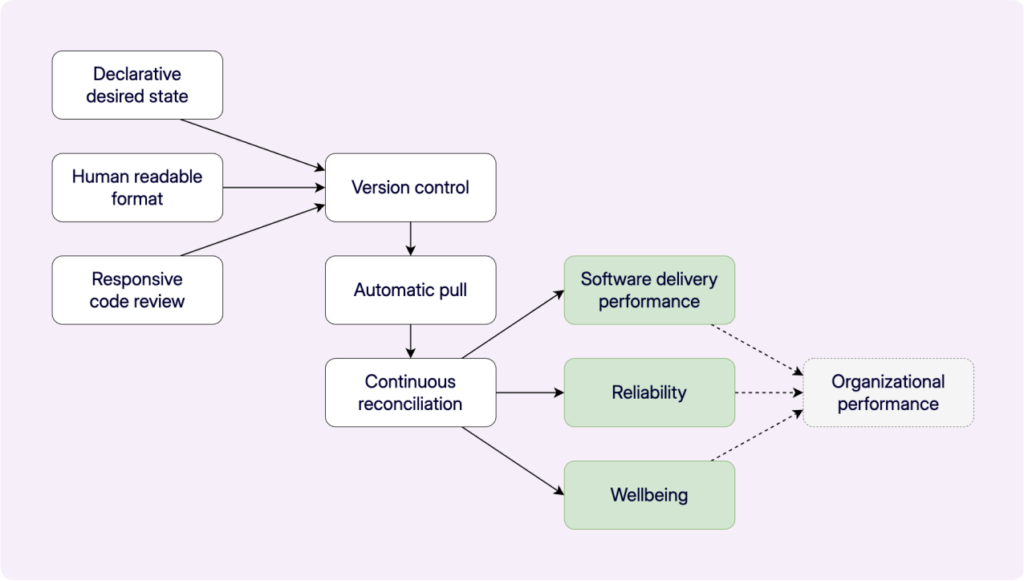
    A significant part of the report introduces the GitOps Model, outlining the 6 practices we found necessary for successful adoption and positive outcomes:

    1. Declarative desired state
    2. Human readable format
    3. Responsive code review
    4. Version control
    5. Automatic pull
    6. Continuous reconciliation
    The GitOps model. Declarative desired state, human readable formats, responsive code review, version control, automatic pull, and continuous reconciliation.

    We developed a GitOps score based on how closely organizations align with these practices and found organizations with higher scores are most likely to obtain the benefits of GitOps. This means teams with higher scores were significantly more likely to report:

    • Increased security
    • Prevention of configuration drift
    • Improved auditability
    • Easier compliance
    • Reduced elevated access

    The ability to recreate applications from version control is also strongly linked to higher scores.

    GitOps practices and DevOps outcomes

    Beyond specific GitOps benefits, the report also examines the relationship between GitOps and broader DevOps outcomes, like software delivery performance, reliability, and even wellbeing. Higher GitOps scores correlate positively with these outcomes.

    It’s essential to be aware of the potential “j-curve” effect when adopting new practices like GitOps. You might see an initial dip in performance as you introduce new skills and practices, but sticking with it leads to significant long-term gains. The 6 GitOps practices are mutually supportive; leaving one out can create gaps in the effectiveness of others.

    Of course, adopting GitOps isn’t without its challenges. The report identifies potential “trip hazards”, like the risk of accidental resource deletion, leaking secrets in version control, overloading version control systems, and gaps in deployment processes or access controls. Understanding these pitfalls and adopting protective measures, like dry-runs, approval workflows, secret management tools, and robust access control, is crucial.

    The State of GitOps Report is a comprehensive baseline for where GitOps stands today. It offers valuable insights into the practices that drive success and helps you understand how to improve your own outcomes.

    We encourage you to dive into the full report to explore the findings, understand the GitOps model, and identify areas for continuous improvement on your GitOps journey.

    Happy deployments!